Most small business websites have the same problem: everything the business does is crammed onto the homepage, and the rest of the site is an About page nobody reads and a contact form. Visitors can't find the one thing they came for, and Google has no clear page to show for each job you do.
Below is the set of pages we plan for almost every small business site, what each page has to contain to earn its place, and the extras that are worth adding once the basics are in.
The core pages
Homepage
The homepage has one job: tell a visitor within a few seconds what you do, where you do it, and how to get in touch. Everything else is supporting detail.
It should include:
- a headline that names your service and your area, e.g. "Boiler repairs and installs across Edinburgh"
- a short line on who you work for
- a clear call to action (call, book, request a quote) near the top
- links to each main service
- a handful of real reviews
- examples of your work
- your phone number, visible without scrolling on a phone
One page per main service
If you do boiler installs, boiler repairs and bathroom fitting, that's three pages. Each one should cover:
- who the service is for, and the kind of job it suits
- what's included, step by step
- a price guide or a "from" price, if you can give one
- the areas you cover for that service
- photos of that type of job
- answers to the questions people ask on the phone
- a call to action at the bottom, and ideally one near the top too
A service page should answer enough that the person who rings you already knows roughly what you charge and whether you cover their postcode.
About
People hire people, so this page is about who they'll be dealing with. Include who runs the business, how long you've been trading, any qualifications or memberships that matter in your trade (Gas Safe, NICEIC, a professional body), and a real photo. Skip the mission statement.
Work, case studies or gallery
Show finished jobs. For a trade, a gallery of before and after photos with a one-line caption ("Full bathroom refit, Leith, 6 days") does more than a paragraph of text. For a service business, two or three short case studies work better: the problem, what you did, the result.
Reviews
Pull in your Google reviews so they stay real and up to date, or collect them on a dedicated page with names and locations where customers have agreed to it. A short selection should also appear on the homepage and service pages, close to the call to action.
Contact
Phone number, email, a short form, the areas you cover and your opening hours. If customers visit you, add your address and a map. Keep the form short: name, contact details, what they need, and their postcode is usually enough.
Why one page per service helps you get found
Google ranks pages, not whole websites. When someone searches "boiler repair Edinburgh", Google looks for the single page that best answers that search.
If all your services sit on one page, that page is a weak match for every search. A page dedicated to boiler repairs, with the right heading, a description of the work, the areas you cover and a few questions answered, is a strong match for that one search. Each new service page gives you another chance to appear for another set of searches.
It helps the visitor too. Someone who lands on your boiler repair page from Google sees exactly what they searched for, instead of a homepage they have to dig through.
Optional pages, and when they're worth it
Location pages
If you serve several towns or areas, a page for each one can help you show up in searches like "electrician Musselburgh". Only build these if you can make each one genuinely useful: jobs you've done in that area, how quickly you can get there, local reviews. Pages that copy the same text and swap the town name tend to do nothing, and can drag the rest of the site down.
Blog or advice section
Worth it if you'll actually write. Two or three useful articles a quarter answering real customer questions ("How long does a loft conversion take?") can bring in searches your service pages won't. An empty blog with one post from three years ago makes the business look closed.
FAQ
A single FAQ page helps if you get the same questions on every call. Better still, put the relevant questions on each service page, where people are reading about that service.
Pricing
If your work can be priced in packages, a pricing page answers the first question most people have and filters out enquiries that were never going to fit your budget. If every job is different, a "from" price or a price guide on each service page does the same job.
The legal pages UK businesses need
- Privacy policy. If your site collects any personal information (a contact form counts), you need one under UK GDPR. It should say what you collect, why, how long you keep it, and how people can ask for it to be deleted.
- Cookie notice. Only needed if your site sets non-essential cookies, such as advertising or some analytics tools. If you don't use them, you don't need a cookie banner.
- Company details. Limited companies must show their registered name, company number, place of registration and registered office address on their website. The footer is the usual place.
An example sitemap for a local trade
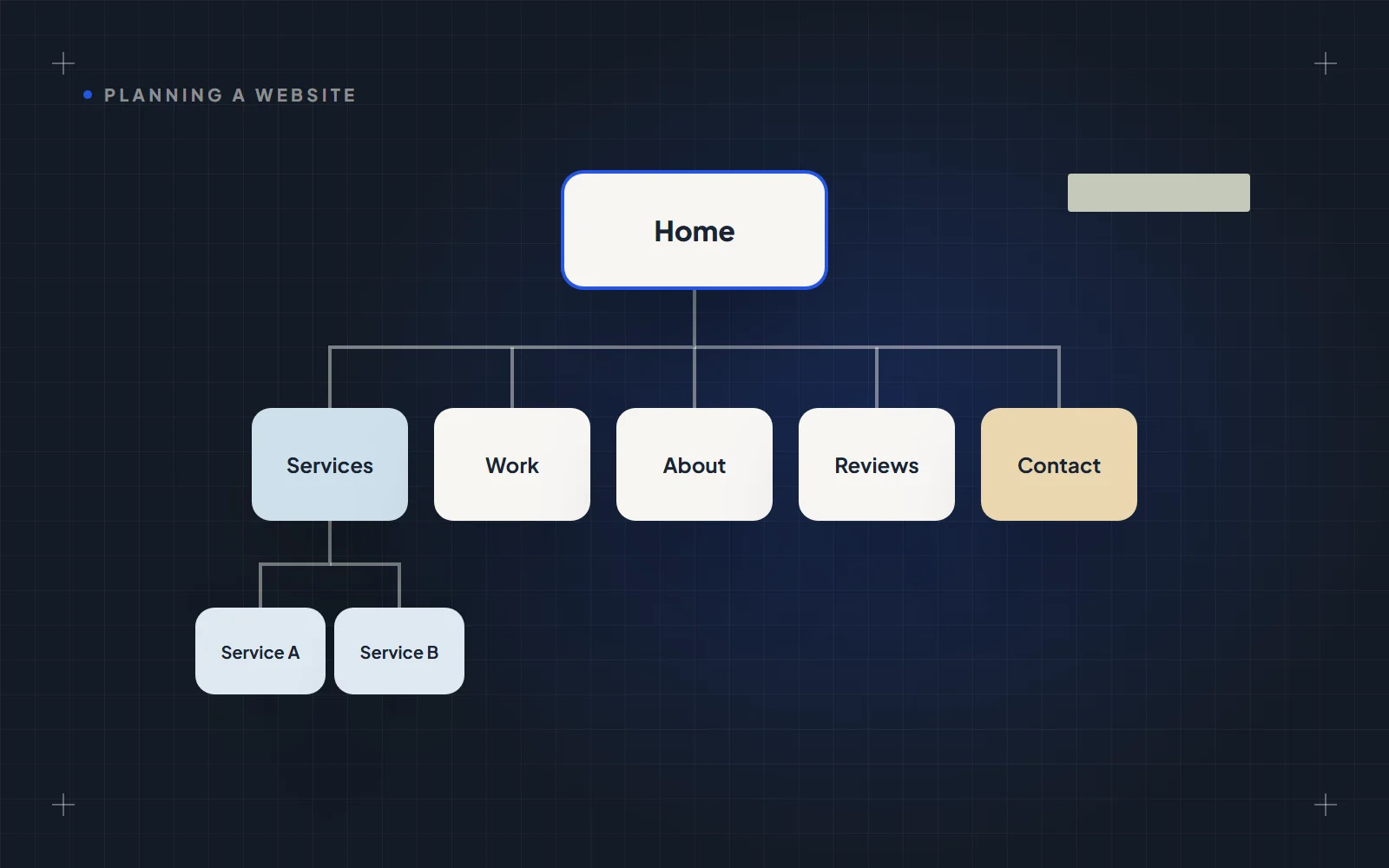
Here's how this looks for a heating engineer covering Edinburgh and the Lothians:
- Home
- Services
- Boiler installation
- Boiler repairs
- Boiler servicing
- Central heating and radiators
- Areas we cover
- Edinburgh
- Midlothian
- East Lothian
- Our work
- Reviews
- About
- Advice (blog)
- Contact
- Privacy policy
That's 15 or so pages. Each one has a clear purpose, and each service and area page has its own chance to show up in search.
How we plan pages at Sitewright
Before any design or build starts, we map out every page your site needs and what goes on each one, and agree it with you. That's what lets us keep a fixed price fixed: the scope is clear from day one, so there are no surprise extras halfway through.
If you're still weighing up costs, our guide to what a small business website costs in the UK breaks down the numbers, and 9 questions to ask before hiring a web designer will help you compare quotes.
When you're ready to plan yours, start a project and we'll map out your pages with you.